How do I cancel my Supergut® Subscription?Updated 3 months ago
Did you know you can skip a delivery instead? Here’s how:
- Log in to your Supergut® account. Once you’re in, find the subscription you’d like to cancel and click "View details →."
- Select "More" on the right-hand side. You’ll then see several options to manage your subscription, including applying a discount code, updating your delivery schedule, and even changing your next order date!
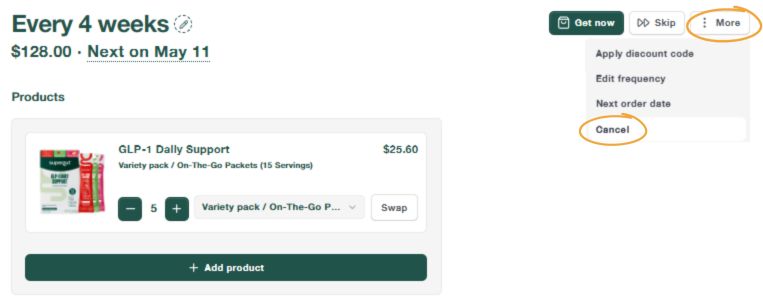
- If you’d still like to cancel, select "Cancel" at the bottom. You'll then see an additional screen with optional subscription offers before your cancellation is complete. If you'd still like to cancel, simply select "Continue."
- Follow the prompt(s) for your cancellation. You will be prompted with a message confirming that your account has been cancelled.
If you have any questions, please don't hesitate to contact one of our Customer Experience representatives.
We’re available Monday through Friday, from 7:00 AM to 4:00 PM PST.
Email: [email protected]
Live chat: https://supergut.com/pages/contact
Mobile SMS (text only): +1 323-784-0062